
Introduction
Payroll accuracy and timing are critical for every business. Employees expect to be paid on time, and payroll taxes must be filed accurately to avoid penalties. That’s why encountering QuickBooks Payroll Error PS038 can be extremely stressful—especially when payroll updates fail just before payday.
This error usually appears when QuickBooks is unable to send payroll data to Intuit’s servers, preventing payroll updates, paycheck submission, or tax table downloads. In most cases, the issue is related to stuck paychecks, data corruption, or communication issues between QuickBooks Desktop and payroll servers.
In this in-depth guide, we’ll explain everything you need to know about QuickBooks Payroll Error PS038, including:
- What the error means
- Why it occurs
- How to fix it step by step (basic to advanced)
- How to prevent it from happening again
This guide is written specifically for US QuickBooks Desktop Payroll users.
Table of Contents
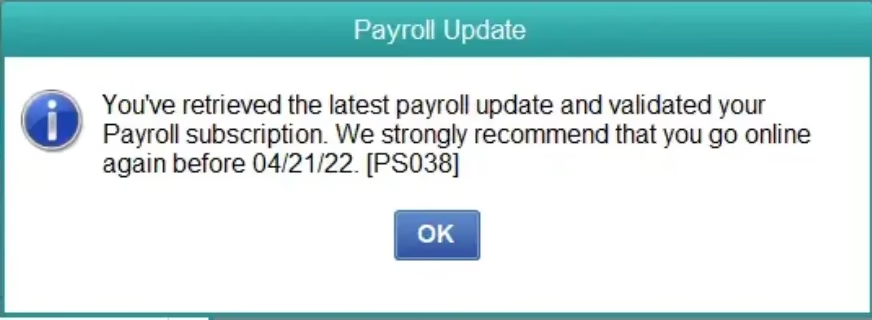
What Is QuickBooks Payroll Error PS038?
QuickBooks Payroll Error PS038 occurs when the software fails to transmit payroll data while downloading payroll updates or sending paycheck information.
The error message typically states:
“QuickBooks is unable to send your payroll data. Error PS038.”
This means QuickBooks detected payroll transactions (usually paychecks) that were created but never successfully sent, blocking further payroll updates.
When Does QuickBooks Payroll Error PS038 Occur?
You may encounter this error during the following situations:
- Downloading payroll updates
- Sending payroll data after running payroll
- Verifying payroll subscription
- Updating tax tables
- Restoring a company file backup
- Upgrading QuickBooks Desktop
Symptoms of QuickBooks Payroll Error PS038
Businesses experiencing PS038 often report the following symptoms:
- Payroll updates fail repeatedly
- One or more employee paychecks are stuck
- Direct deposit remains “pending”
- Payroll tax tables do not update
- QuickBooks freezes during payroll tasks
- Payroll forms won’t process or submit
These symptoms indicate that payroll data transmission is blocked, requiring immediate attention.
Root Causes of QuickBooks Payroll Error PS038
Understanding the root cause helps apply the right fix faster.
1. Stuck or Unsent Paychecks (Most Common Cause)
One or more paychecks were created but not successfully sent to Intuit’s payroll servers.
2. Corrupted Payroll Data
Payroll items, tax components, or employee records may be damaged.
3. Outdated QuickBooks Desktop
Older versions may not communicate properly with payroll servers.
4. Payroll Subscription Issues
Expired, inactive, or incorrectly verified payroll subscriptions.
5. Internet or Firewall Restrictions
Blocked ports or antivirus software preventing QuickBooks from sending payroll data.
Versions Affected by Payroll Error PS038
- QuickBooks Desktop Pro Payroll
- QuickBooks Desktop Premier Payroll
- QuickBooks Desktop Enterprise Payroll
QuickBooks Online Payroll is not directly affected, but this error may occur during data migration from Desktop to Online.
Solution 1: Update QuickBooks Desktop (Required First Step)
Running outdated software is one of the biggest reasons for payroll errors.
Steps:
- Open QuickBooks Desktop
- Go to Help → Update QuickBooks Desktop
- Click Update Now
- Select Reset Update
- Click Get Updates
- Restart QuickBooks after update
- Verify your latest tax table updates
This ensures compatibility with payroll servers.
Solution 2: Download the Latest Payroll Tax Table
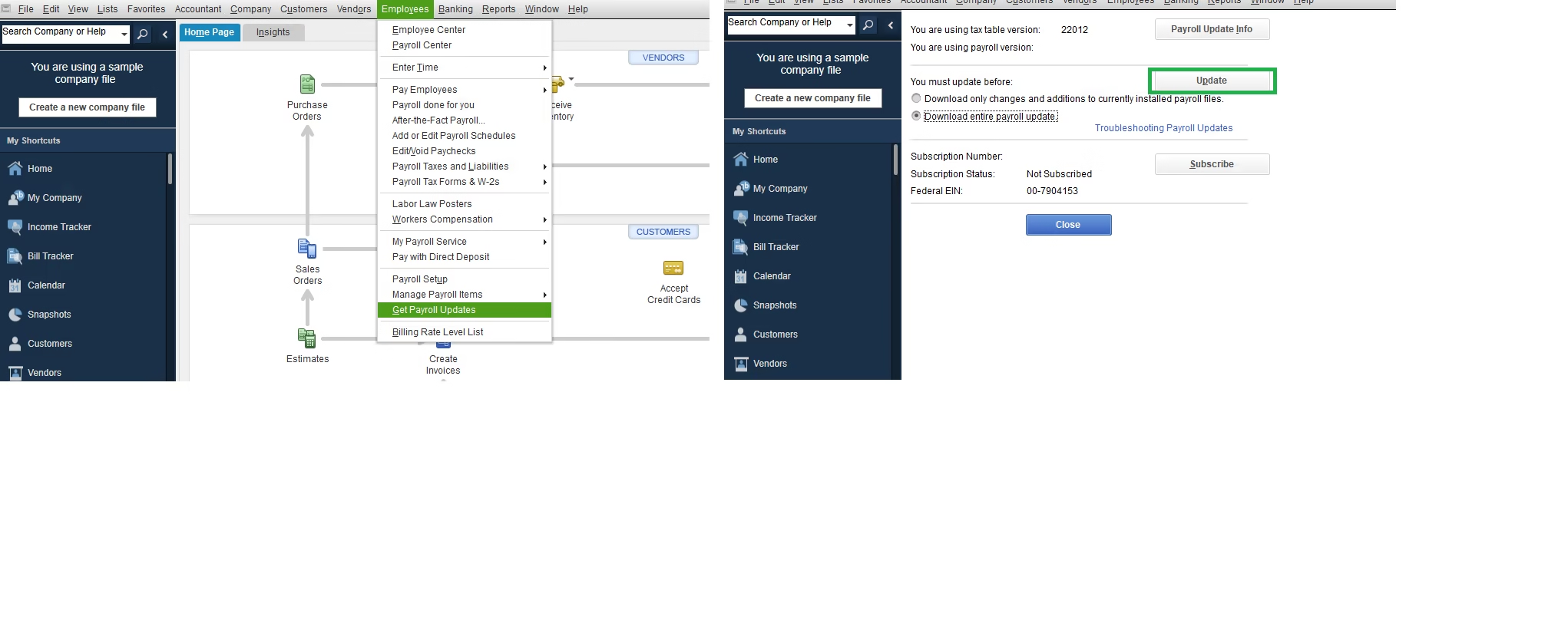
Payroll updates often fail because tax tables are outdated.
- Go to Employees → Get Payroll Updates
- Check Download Entire Update
- Click Download Latest Update
- Wait for the confirmation message
Solution 3: Identify Stuck Paychecks (Critical Step)
This is the most important step to fix PS038.
- Press Ctrl + Y to open Transaction Journal
- Go to Employees → Edit/Void Paychecks
- Look for paychecks with:
- Net pay = 0
- Status showing “Online to send”
- Note affected employee names and paycheck dates
Even one stuck paycheck can block all payroll updates.
Solution 4: Send Payroll Data Manually
- Go to Employees → Send Payroll Data
- Select Send All
- Wait for confirmation
If the error persists, proceed to advanced steps.
Solution 5: Verify and Rebuild Company File
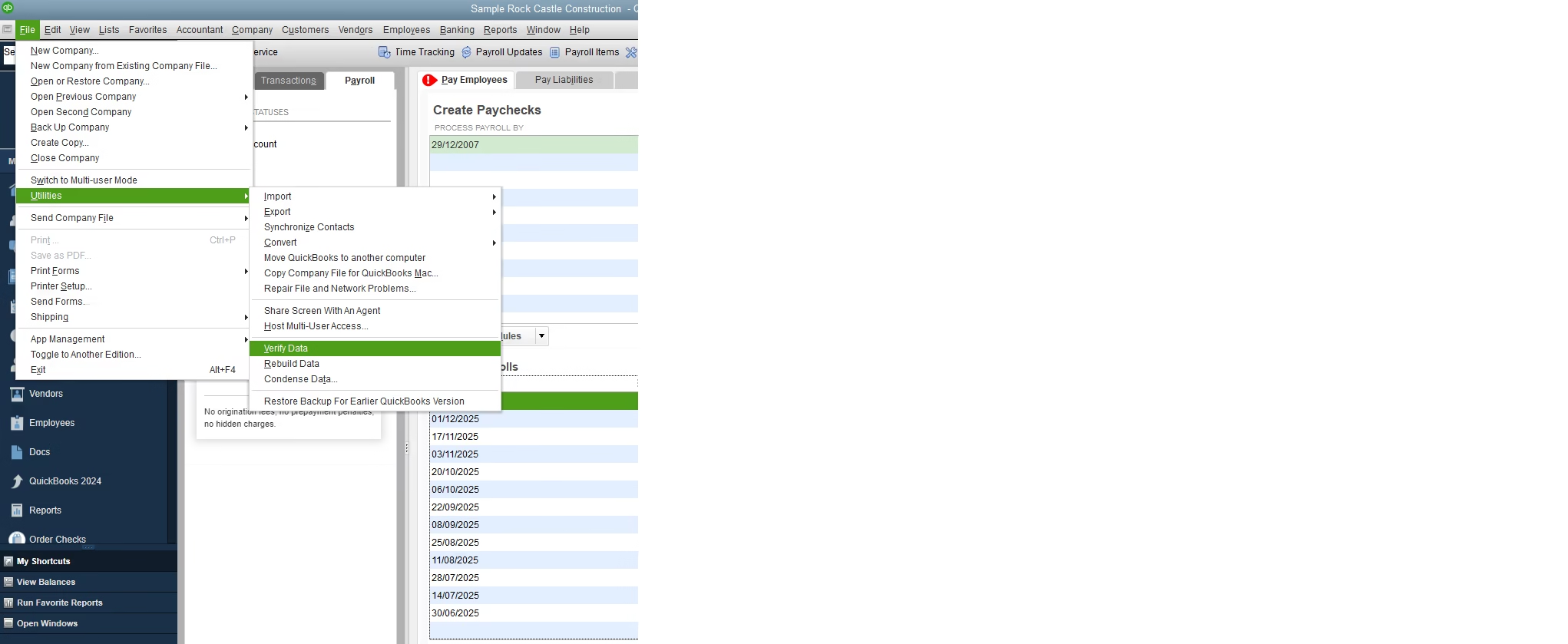
Payroll errors are often caused by company file corruption.
Verify Data
- File → Utilities → Verify Data
Rebuild Data
- File → Utilities → Rebuild Data
- Back up the file when prompted
- Allow rebuild to complete
Solution 6: Create and Send a Dummy Paycheck
This forces QuickBooks to reset payroll transmission.
- Create a temporary test employee
- Create a $0 payroll check
- Send payroll data
- Delete test employee afterward
Solution 7: Run QuickBooks File Doctor
- Download QuickBooks Tool Hub
- Open Tool Hub → Company File Issues
- Run QuickBooks File Doctor
- Scan and repair the company file
Solution 8: Check Payroll Subscription Status
- Go to Employees → My Payroll Service → Account/Billing Info
- Sign in
- Confirm:
- Payroll status is Active
- EIN is correct
Solution 9: Configure Firewall and Internet Settings
Ensure QuickBooks can communicate with payroll servers.
- Open ports 80 and 443
- Add QuickBooks to firewall exceptions
- Temporarily disable antivirus for testing
Solution 10: Restore a Clean Backup (Last Resort)
If the error started recently:
- Restore a backup from before the issue
- Re-enter recent payroll carefully
- Send payroll data again
How to Prevent QuickBooks Payroll Error PS038
- Update QuickBooks before every payroll run
- Always send payroll data after processing
- Avoid force-closing QuickBooks during payroll
- Maintain a stable internet connection
- Back up company files daily
Final Thoughts
QuickBooks Payroll Error PS038 is serious but completely fixable. Most cases are caused by stuck paychecks, outdated software, or corrupted payroll data. By following the structured troubleshooting steps above—from basic updates to advanced fixes—you can restore payroll functionality and avoid future disruptions.
For businesses running payroll regularly, preventive maintenance and timely updates are the best defense.
Frequently Asked Questions (FAQs)
What does QuickBooks Payroll Error PS038 mean?
It means QuickBooks cannot send payroll data due to stuck or corrupted paychecks.
Can PS038 delay employee payments?
Yes. Direct deposits and paychecks may fail.
Is PS038 a data corruption issue?
In most cases, yes—especially related to payroll transactions.
Can professional support fix PS038 faster?
Yes, especially for complex payroll files.
Need Immediate Help Fixing QuickBooks Payroll Error PS038?
Don’t risk payroll delays or IRS penalties.
Our certified QuickBooks payroll experts can diagnose and fix Error PS038 quickly—without data loss.