
If your accountant, tax preparer, auditor, or internal finance team asked for a Trial Balance from QuickBooks Online, they usually need a clean snapshot of your general ledger balances for a specific date or reporting period. The export is simple, but the details matter: the date, accounting method, filters, and timing of the export can all change the numbers.
This guide explains how to export Trial Balance from QuickBooks Online to Excel or PDF, how to confirm the report is correct, what to do when the export does not work, and when it may be safer to get help before sending the file.
Table of Contents
Quick Answer
To export a Trial Balance from QuickBooks Online, open the correct company, go to Reports, search for Trial Balance, set the report period and accounting method, click Run report, then use the Export icon on the report toolbar to export the report to Excel or PDF if that option is available.
The exported file is a static copy of the report as it appeared at the time of export. If transactions are later added, edited, deleted, voided, or reclassified in QuickBooks Online, the exported file will not update automatically.
What Is a Trial Balance in QuickBooks Online?
A Trial Balance is an accounting report that lists general ledger accounts and their debit or credit balances for a selected date or period. Accountants commonly use it before preparing adjusting entries, financial statements, tax returns, or year-end workpapers.
In practical terms, the Trial Balance helps answer questions such as:
- Do total debits equal total credits?
- What are the balances in asset, liability, equity, income, and expense accounts?
- Are there unusual balances in accounts such as Uncategorized Income, Uncategorized Expense, Ask My Accountant, or Suspense?
- Do the balances match the accounting method requested by the accountant?
- Are period-end adjustments needed before reports are finalized?
A Trial Balance is not the same as a full backup of your QuickBooks Online company. It is only a report export based on the selected dates, accounting method, columns, and filters.
Before You Export the Trial Balance
Before clicking the export button, take a minute to confirm the report setup. Many Trial Balance problems are not export problems at all; they are report setup problems.
| Check | Why It Matters |
|---|---|
| Correct QuickBooks company | Many users have access to more than one company file. Exporting from the wrong company can waste time and create confidentiality issues. |
| Correct report period | A Trial Balance for December 31 is very different from one run for the current month or current year. |
| Correct accounting method | Cash and accrual reports can produce materially different balances. |
| Report filters | Class, location, customer, vendor, or account filters can change the report and make it difficult to compare with other reports. |
| User permissions | Users with limited access may not see the report or may not be able to view all report data. |
| Browser downloads | If downloads or pop-ups are blocked, QuickBooks may run the report but the exported file may not appear. |
You will also need a program that can open the exported file. For Excel exports, Microsoft Excel or another compatible spreadsheet application is typically used. For PDF exports, use a PDF viewer.
How to Export Trial Balance from QuickBooks Online
Use these steps when working in QuickBooks Online. QuickBooks Desktop uses a different menu path, which is covered later in this article.
1. Sign in to the Correct QuickBooks Online Company
Log in to QuickBooks Online and open the company file that contains the accounting records you need. This sounds basic, but it is one of the easiest mistakes to make if you manage multiple businesses or client files.
Before running the report, confirm the company name shown in QuickBooks Online. If you export a report from the wrong company and send it externally, you may expose sensitive financial information.
2. Open the Reports Area
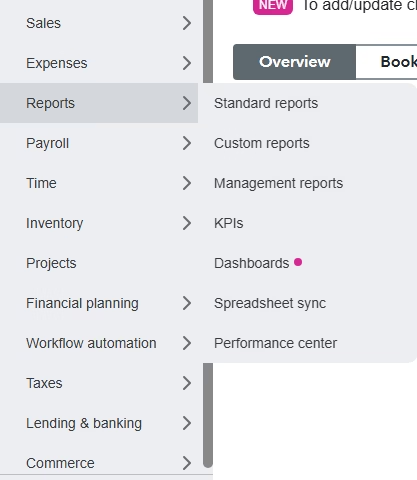
From the left navigation menu, select Reports. This is where QuickBooks Online stores standard financial and accounting reports.
If you do not see the Reports option or cannot access the report you need, your user role may not include reporting permissions. In that case, ask the QuickBooks company administrator or accountant user to review your access.
3. Search for the Trial Balance Report
In the report search field, type Trial Balance. Open the Trial Balance report from the search results. Depending on your QuickBooks Online subscription, region, and permissions, report availability may vary.
If the report does not appear, do not assume the data is missing. First check whether you are in the correct company, whether your subscription includes the report, and whether your user permissions allow access to accountant-related reports.
4. Set the Report Period or As-Of Date
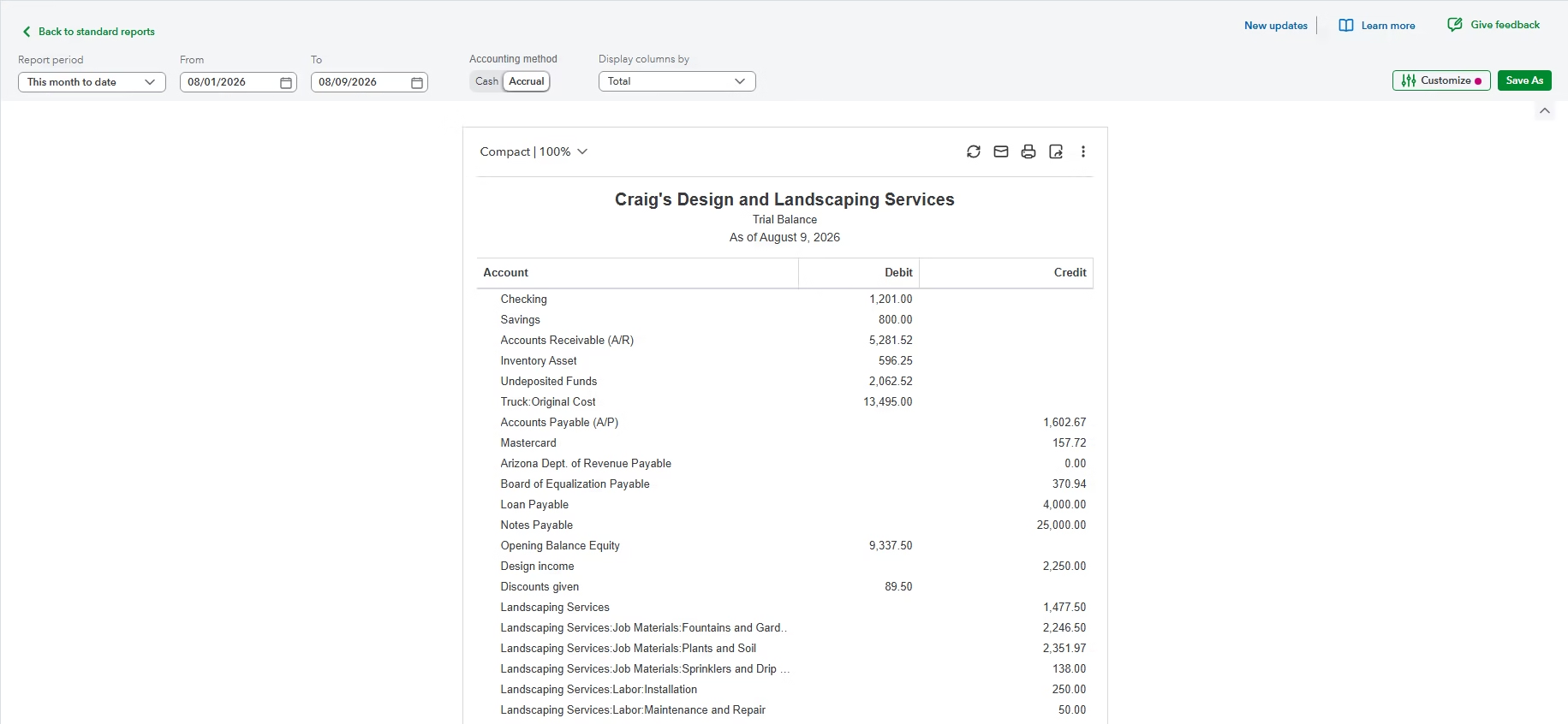
Choose the date or reporting period requested by your accountant or internal reviewer. For year-end tax work, this is often the last day of the fiscal year. For monthly review, it may be the month-end date.
This step matters because a Trial Balance is date-sensitive. If you run it for the wrong period, the export may still look valid, but the balances may not be useful for the intended purpose.
Example: If your tax preparer asks for an accrual Trial Balance as of December 31, exporting a report for the current date may include transactions posted after year-end. That can cause the tax workpapers to disagree with your year-end financial statements.
5. Select the Accounting Method If Available
If the Trial Balance report screen gives you an accounting method option, select the basis requested: Accrual or Cash. Many accountants prefer accrual basis for review and year-end work unless they specifically request cash basis.
Cash basis and accrual basis are not interchangeable. Accrual basis generally records income and expenses when earned or incurred. Cash basis generally records them when money is received or paid. If the wrong basis is used, balances can differ from the Balance Sheet, Profit and Loss, or accountant’s workpapers.
6. Customize the Report If Needed
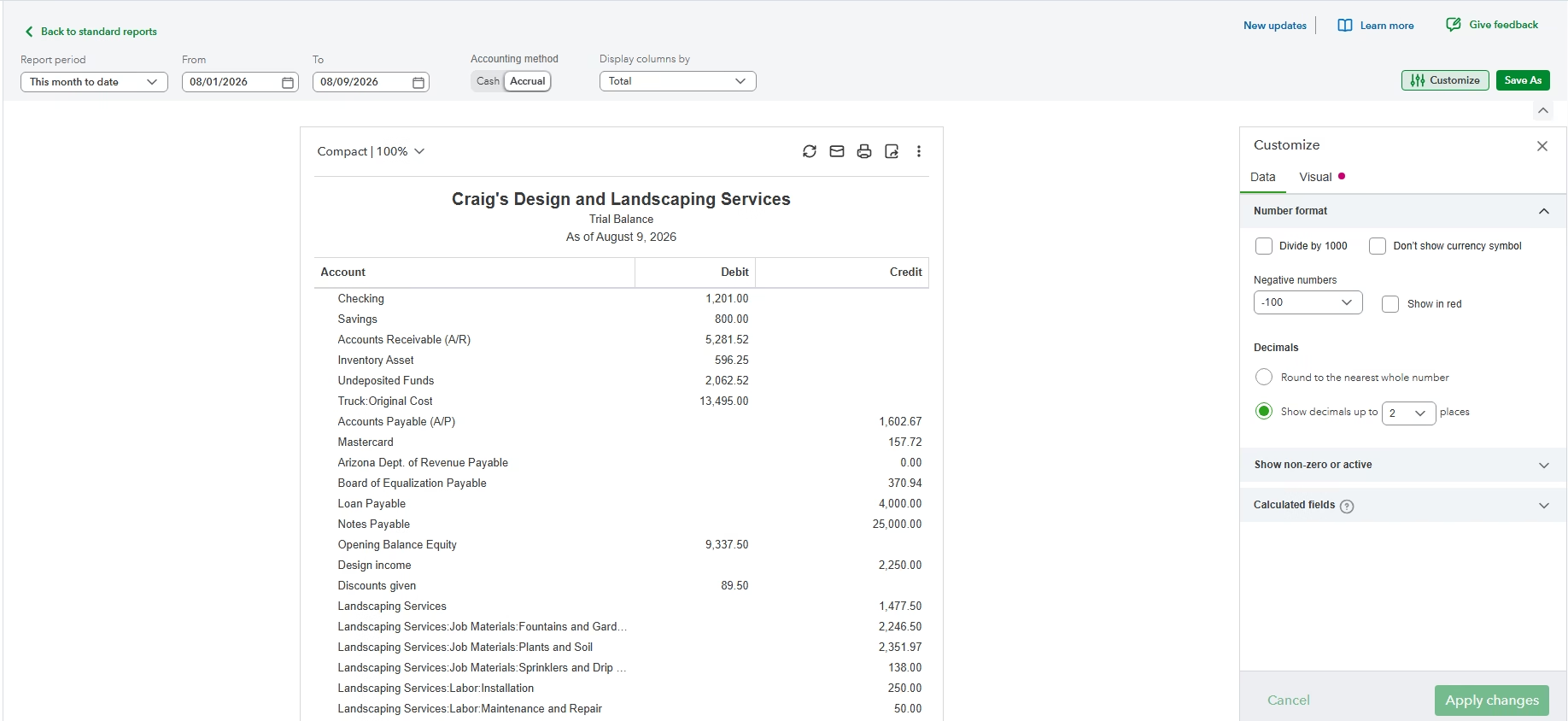
Use Customize only if you need specific report changes, such as account filters, class filters, location filters, customer filters, vendor filters, or column adjustments. If an accountant requested an unfiltered Trial Balance, avoid adding filters unless you clearly document them.
From a bookkeeping perspective, it is safer to export a standard, unfiltered Trial Balance unless the purpose of the report requires segmentation. A filtered Trial Balance can be useful, but comparing it to an unfiltered Balance Sheet or General Ledger may create confusion.
7. Click Run Report
After changing dates, basis, or filters, select Run report. This refreshes the report using the current settings.
One common mistake is changing the report period and exporting immediately without running the report again. If QuickBooks has not refreshed the report, the exported file may not reflect the settings you intended to use.
8. Use the Export Icon
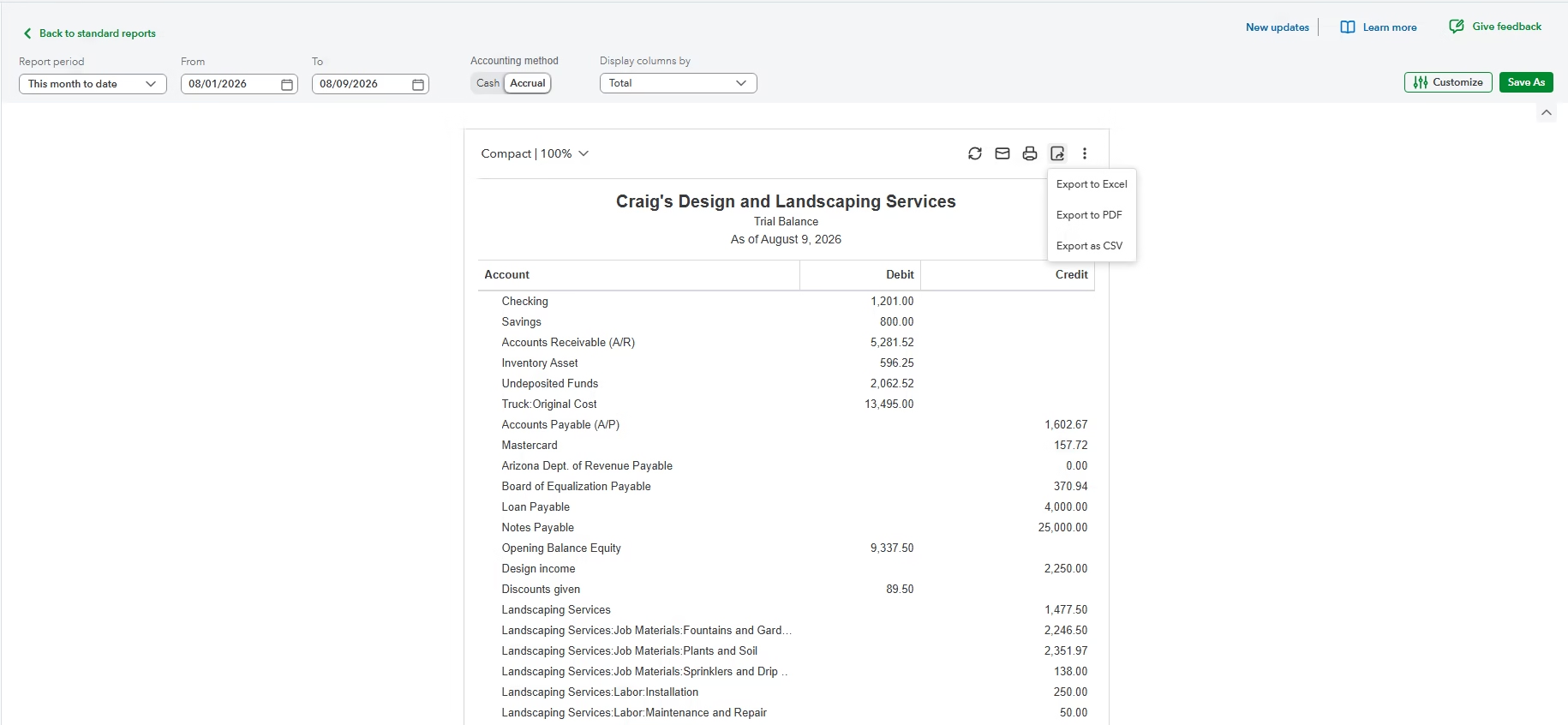
On the report toolbar, select the Export icon. QuickBooks Online will show the available export options for that report.
Choose Export to Excel if you need a spreadsheet file for analysis, workpapers, or accountant review. Choose Export to PDF if you need a fixed-format report for sharing, printing, or documentation and that option is available.
9. Open and Save the Downloaded File
Open the downloaded file and confirm it displays correctly. Save it in the appropriate folder using a clear file name. A practical naming format is:
CompanyName-Trial-Balance-Accrual-2024-12-31.xlsx
If you are sending the file to an accountant or outside party, use secure sharing methods. A Trial Balance contains sensitive financial information and should not be sent casually or stored in an unsecured location.
Export to Excel vs. Export to PDF
QuickBooks Online report exports are limited to the options shown on the report screen. When both Excel and PDF are available, choose the format based on how the file will be used.
| Format | Best For | Limitation |
|---|---|---|
| Excel | Accountant analysis, workpapers, sorting, formulas, and review | Spreadsheet edits do not update QuickBooks Online and can accidentally change the working copy |
| Fixed presentation, printing, documentation, and read-only sharing | Less useful for analysis or adjusting workpapers |
If you export to Excel, keep an unedited original copy. If you need to make notes, formulas, or reclassifications in the spreadsheet, save a separate working copy so the original export remains intact.
How to Verify the Exported Trial Balance
Do not assume the file is correct simply because it downloaded. A quick verification can prevent avoidable accounting problems later.
- Confirm the company: Make sure the file came from the correct QuickBooks Online company.
- Confirm the report name: The file should show Trial Balance, not General Ledger, Balance Sheet, or another report.
- Confirm the dates: Check the report period or as-of date in the exported file.
- Confirm the basis: Make sure cash or accrual matches the requested accounting method.
- Confirm filters: If filters were used, document them when sending the file.
- Check debit and credit totals: Total debits should equal total credits.
- Compare to the screen: The exported report should match the QuickBooks report shown before export.
- Open the file: Confirm Excel or the PDF viewer can open it properly.
- Store it securely: Treat the file as confidential financial information.
If the numbers do not match what you expected, review the report settings before editing the spreadsheet. The cause is often a date, basis, or filter difference.
Common Problems and How to Fix Them
The Trial Balance Is Blank
A blank Trial Balance usually means the selected date range excludes the relevant transaction activity, the wrong company file is open, or the user does not have sufficient access. Start by widening the report period and confirming you are in the correct QuickBooks company.
The Export File Does Not Download
If the export appears to run but no file downloads, check your browser’s download settings, pop-up restrictions, and security prompts. Try again after allowing downloads from QuickBooks Online. Large reports may also take longer to generate depending on company file size and browser performance.
Excel Opens the File in Protected View
Excel may open downloaded files in Protected View because the file came from the internet. This is normal security behavior. Review the file source before enabling editing. If you only need to view or send the original report, you may not need to edit it at all.
The Trial Balance Does Not Match the Balance Sheet or Profit and Loss
First compare the report dates and accounting method. A cash basis Profit and Loss will not necessarily agree with an accrual basis Trial Balance. Also check whether one report has class, location, account, customer, or vendor filters while the other does not.
Balances Changed After You Exported the Report
The exported Trial Balance is static. If someone changes prior transactions in QuickBooks Online after the export, the current report can differ from the file you already saved. If the change is unexpected, review recent transaction edits and consider using the audit log to investigate what changed.
Some Accounts Show Unexpected Balances
Unexpected balances may come from prior-period transactions, journal entries, account reclassifications, or activity posted to clearing or suspense-type accounts. Review accounts such as Uncategorized Income, Uncategorized Expense, Ask My Accountant, and Suspense before sending final reports.
Common Mistakes to Avoid
- Exporting before selecting the correct report period.
- Forgetting to click Run report after changing report settings.
- Using cash basis when the accountant requested accrual basis.
- Comparing a filtered Trial Balance to unfiltered financial statements.
- Assuming the exported spreadsheet updates when QuickBooks Online changes.
- Editing account names or balances in Excel and treating the spreadsheet as the official accounting record.
- Sending an unsecured Excel file that contains sensitive financial data.
- Following QuickBooks Desktop instructions while working in QuickBooks Online.
Best Practices for Accountant and Year-End Exports
If the Trial Balance is being prepared for tax work, financial statement review, or year-end accounting, the timing of the export matters.
- Complete bank and credit card reconciliations before exporting period-end reports.
- Use accrual basis unless your accountant specifically asks for cash basis.
- Post period-end adjusting journal entries before preparing the final Trial Balance.
- If needed, export both pre-adjustment and post-adjustment versions and label them clearly.
- Save the file name with the company name, report name, basis, and date.
- Keep an original copy that has not been edited in Excel.
- Export the General Ledger as well if the accountant needs transaction-level detail.
- Document any filters used, especially class or location filters.
A clean Trial Balance export can save time during tax preparation and review. A poorly labeled or filtered export can create extra questions, duplicate requests, and avoidable back-and-forth.
QuickBooks Online vs. QuickBooks Desktop Trial Balance Export
QuickBooks Online and QuickBooks Desktop do not use the same navigation. If you are using QuickBooks Desktop, open the company file, go to Reports, then Accountant & Taxes, then Trial Balance. Set the correct date range, use Customize Report if needed, then use the Excel button on the report toolbar to create a new worksheet or update an existing worksheet.
Be careful with the Update Existing Worksheet option in QuickBooks Desktop. Use it only when you intentionally want to send the report into an existing workbook. For most one-time exports, creating a new worksheet is safer.
This article focuses on QuickBooks Online, so do not use Desktop menu paths if you are working in a browser-based QuickBooks Online company.
When Professional Help Makes Sense
Exporting a Trial Balance is usually straightforward, but the accounting behind the numbers can be more complicated. Professional help may be appropriate if:
- The Trial Balance does not agree with expected financial statements.
- There are large balances in Uncategorized, Suspense, or Ask My Accountant accounts.
- Prior-period transactions were changed and you need to understand the impact.
- You need pre-adjustment and post-adjustment reports for year-end review.
- You are preparing reports after a cleanup, migration, or bulk import.
- Your accountant is requesting multiple reports and the numbers do not reconcile.
- You are not sure whether to use cash or accrual basis.
In those situations, the risk is not the export button itself. The risk is sending a report that looks official but contains incomplete, misclassified, or incorrectly filtered data.
FAQ
Can I export a Trial Balance from QuickBooks Online to Excel?
Yes. Open the Trial Balance report in QuickBooks Online, set the correct report period and basis, click Run report, then use the Export icon and choose the Excel option if it is available.
Can I export a Trial Balance from QuickBooks Online to PDF?
QuickBooks Online may offer a PDF export option from the report toolbar. If the option appears, use it when you need a fixed-format report for printing, documentation, or sharing.
Why does my exported Trial Balance not match what my accountant expected?
The most common reasons are different report dates, different accounting methods, filters, later transaction changes, or adjusting journal entries that were not posted before export. Compare the report settings before assuming the data is wrong.
Does an exported Trial Balance update automatically?
No. The exported file is a snapshot. If transactions are later added, edited, deleted, voided, or reclassified in QuickBooks Online, you must run and export the report again.
Should I export the Trial Balance on cash or accrual basis?
Use the basis requested by your accountant or tax preparer. If no one specified a basis, accrual is often preferred for accounting review, but some tax or internal reporting situations may require cash basis.
Why is my Trial Balance blank in QuickBooks Online?
The report period may not include transaction activity, you may be in the wrong company file, or your user permissions may restrict access. Check the company, widen the date range, and confirm reporting permissions.
Can I edit the exported Excel Trial Balance?
You can edit the Excel file, but those edits do not change QuickBooks Online. Keep an unedited original export and use a separate working copy for notes, formulas, or analysis.
Is a Trial Balance export the same as a QuickBooks backup?
No. A Trial Balance export is only a report file. It does not contain the full QuickBooks Online company data and should not be treated as a backup.
Key Takeaways
- Run the Trial Balance from the Reports area in QuickBooks Online.
- Set the correct report period, accounting method, and filters before exporting.
- Click Run report after changing report settings.
- Use Excel for analysis and PDF for fixed-format sharing.
- The exported report is static and will not update when QuickBooks data changes.
- Verify the company, date, basis, filters, and debit/credit totals before sending the file.
- Protect the exported file because it contains sensitive financial information.
Conclusion
Exporting a Trial Balance from QuickBooks Online is a simple reporting task, but accuracy depends on the setup. Before sending the file to an accountant or using it for year-end work, confirm the company, dates, accounting method, filters, and totals. If the numbers look wrong, investigate the report settings and recent transaction changes before editing the spreadsheet or assuming QuickBooks is incorrect.
For routine reporting, the standard QuickBooks Online export tools are usually enough. For cleanup, year-end adjustments, reporting discrepancies, or complex accountant requests, getting help can save time and reduce the risk of sending incomplete financial information.
Need Expert Help with QuickBooks?
If your Trial Balance export does not match your financial statements, contains unusual balances, or needs to be prepared after cleanup, migration, or adjusting entries, Databrax can help with QuickBooks reporting assistance, data export support, cleanup review, and practical QuickBooks troubleshooting. We can help you identify why the numbers changed, prepare cleaner reports, and make sure the file you send is useful for accounting or tax work.